
 Olivia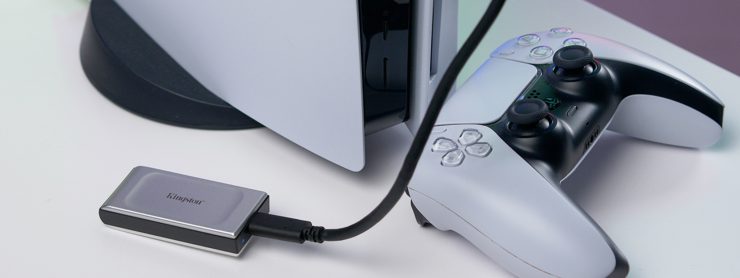
One of the biggest questions among PlayStation owners is can you play ps5 games on external ssd. With game file sizes getting larger and internal storage filling up quickly, many players are looking for faster, more convenient storage solutions. External SSDs promise speed and portability, but the PS5 has specific rules when it comes to running and storing games. In this article, “Can You Play PS5 Games on External SSD? The Complete Answer,” we’ll clear up the confusion, explain what’s possible, and help you choose the best storage setup for your console.
How PS5 Handles Game Storage
The PlayStation 5 (PS5) features a custom ultra-fast NVMe SSD that transforms how games load and run. This advanced storage greatly reduces loading times, improves performance, and allows for smooth, seamless gameplay. The PS5’s internal SSD has 825 GB of total storage, with about 667 GB available for games and apps after system files are accounted for.
Its super-fast read speed of up to 5.5 GB/s lets games load almost instantly, enabling larger, more detailed game worlds without long waits. PS5 games are designed to run directly from the internal SSD or a compatible M.2 SSD expansion. The console supports M.2 drives from 250 GB to 8 TB, provided they meet Sony’s speed and size requirements.
External USB drives can be used to store PS5 games, but PS5 titles cannot be played directly from them. PS4 games, however, can be stored and played from external SSDs, making them ideal for backward-compatible titles. In short, the PS5’s powerful SSD is central to its next-generation performance, delivering faster load times, smoother gameplay, and a more responsive gaming experience.
Can You Play PS5 Games on an External SSD?
No, PS5 games cannot be played directly from an external SSD. PS5 games need very fast storage to run properly, which is why this restriction exists.
- Optimized for Internal SSD: PS5 games are designed to run on the console’s ultra-fast internal SSD, which delivers extremely high read/write speeds. This allows games to load assets, textures, and worlds almost instantly. Using slower storage would slow loading times and could cause performance issues.
- External SSD Limitations: External SSDs connect via USB, which is significantly slower than the internal NVMe SSD. While external drives are great for storing files or PS4 games, they cannot provide the bandwidth required for next-gen PS5 titles. This means you can’t launch or play PS5 games directly from an external SSD.
What You Can Do Instead
- Store PS5 Games: Use the external SSD as extra storage to keep PS5 games that you’re not currently playing. This helps free up space on your internal SSD.
- Transfer for Gameplay: When you want to play a stored game, transfer it back to the internal SSD. This way, you still enjoy the ultra-fast load times and smooth performance of the PS5.
For those who need more high-speed storage without relying solely on the built-in SSD, installing a compatible M.2 NVMe SSD inside the PS5 is recommended. These drives meet Sony’s speed requirements, allowing you to play PS5 games directly from the expansion SSD with performance similar to the internal drive.
What You Can Play from an External SSD
- PS4 Games: You can play PS4 games directly from a USB drive or external SSD connected to your PS5. You can also set the PS5 to automatically install PS4 games to external storage, which helps save space on your internal SSD.
- PS5 Games — Storage Only: You can store PS5 games on an external SSD or USB drive, but you cannot play them directly from it. To play a PS5 game, you must first move or copy it back to the internal SSD or a compatible M.2 SSD.
- Media and Game Data: External storage can be used to save screenshots, video clips, and game save backups, helping free up space on your internal drive while keeping your data organized and easily accessible.
Benefits of Using an External SSD with PS5
Using an external SSD with your PS5 provides several benefits, making storage management and gaming smoother:
1. Expanded Storage Capacity
The PS5’s internal SSD provides around 667 GB of usable space. Adding an external SSD provides extra storage space for games and media, making it ideal for large game libraries.
2. Efficient Game Management
An external SSD lets you store PS4 games and archived PS5 titles, keeping your internal SSD free for the games you play most. Transferring games between drives is quick and easy, ensuring smooth performance.
3. Portability and Convenience
External SSDs are compact and lightweight, allowing you to take your games and media with you wherever you go.
4. Faster Load Times for PS4 Games
Playing PS4 games from an external SSD is faster than from a traditional hard drive, which reduces load times and makes gameplay smoother, especially for larger games.
5. Cost-Effective Storage
External SSDs are generally more affordable than upgrading the internal M.2 SSD, offering a practical way to expand storage without a significant investment.
Adding an external SSD to your PS5 boosts storage, streamlines game management, improves PS4 game load times, and adds portability, all at a reasonable cost. It’s a simple, practical way to enhance your gaming experience.
Recommended External SSDs for PS5 Gaming
Expanding your PS5 storage with an external SSD can improve game management and performance. ADATA offers several models optimized for gaming, combining speed, durability, and efficient heat management.
- ADATA SC750 External SSD: Lightweight and portable, with read/write speeds of 1,050/1,000 MB/s. Ideal for transferring and storing large game files quickly, this device is compatible with the PS5 and other modern consoles.
- ADATA SE920 External SSD: Features USB4 40Gbps Type-C connectivity with blazing read/write speeds of 3,800/3,700 MB/s. Its built-in micro fan helps dissipate heat, ensuring smooth, uninterrupted gaming even during long sessions.
Explore ADATA’s external SSD lineup to find the best option for your PS5. Whether you need speed, durability, or advanced cooling, ADATA has an SSD to enhance your gaming setup.
Conclusion
PS5 games cannot be played directly from an external SSD. They are designed to run on the console’s ultra-fast internal SSD or a compatible M.2 NVMe SSD, which provides the high-speed performance required for smooth gameplay, instant loading, and detailed game worlds. External SSDs are slower than the internal drive, but they are ideal for storing PS5 games when not in use and for keeping PS4 games, which can be played directly from the external drive.
Using an external SSD with your PS5 offers many benefits: it expands storage, improves game management, reduces load times for PS4 games, and adds portability, all at a lower cost than upgrading the internal SSD. For optimal PS5 performance, store active PS5 titles on the internal or M.2 SSD and use an external SSD for backups, archived games, and media.
Recommended options, such as the ADATA SC750 and ADATA SE920, provide reliable speed, durability, and cooling, making them excellent choices to enhance your PS5 setup.

Add comment